
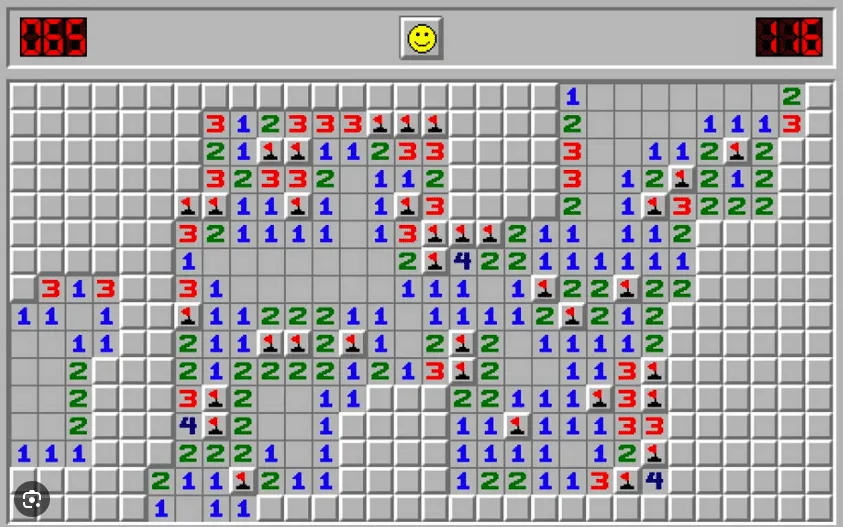
Creating Classic Minesweeper Game with Python will challenge your logic and memory skills. The goal is to clear a grid of hidden mines without detonating any of them, by using clues about the number of neighboring mines in each cell.
In this blog post, we will show you how to create your own Minesweeper game with Python, using the console as the interface. You will learn how to use Python’s built-in modules and data structures, such as random, sys, and lists, to generate and manipulate the game board. You will also learn how to handle user input and output, and implement the game logic and rules.
Table of Contents
Step 1: Display an Empty Grid
The first step is to display an empty grid of a given size on the console. We will use a two-dimensional list to store the grid values, and a nested for loop to print them.
We will also use some constants to represent the symbols for the cells, such as empty (’ ‘), mine (’*‘), flag (‘F’), question mark (’?‘), and hidden (’#’).
We will use the sys module to clear the screen before printing the grid, and the random module to generate random numbers later.
Here is the code for this step:
# Import modules
import sys
import random

# Define constants
EMPTY = ' '
MINE = '*'
FLAG = 'F'
QUESTION = '?'
HIDDEN = '#'

# Define grid size
ROWS = 9
COLS = 9

# Create an empty grid
grid = [[EMPTY for col in range(COLS)] for row in range(ROWS)]

# Clear the screen
def clear():
    if sys.platform == 'win32':
        os.system('cls')
    else:
        os.system('clear')

# Print the grid
def print_grid():
    clear()
    print('    ', end='')
    for col in range(COLS):
        print(col + 1, end=' ')
    print()
    print('   ', end='')
    print('+', end='')
    print('-' * (COLS * 2 - 1), end='')
    print('+')
    for row in range(ROWS):
        print(row + 1, end=' | ')
        for col in range(COLS):
            print(grid[row][col], end=' ')
        print('|')
    print('   ', end='')
    print('+', end='')
    print('-' * (COLS * 2 - 1), end='')
    print('+')

# Test the grid display
print_grid()
The output should look like this:
     1 2 3 4 5 6 7 8 9
   +-------------------+
1 |                     |
2 |                     |
3 |                     |
4 |                     |
5 |                     |
6 |                     |
7 |                     |
8 |                     |
9 |                     |
   +-------------------+
Step 2: Randomly Place Mines
The next step is to randomly place a given number of mines on the grid. We will use the random module to generate random row and column indices, and check if the cell is empty before placing a mine.
We will also use a constant to represent the number of mines, and a variable to keep track of how many mines are placed.
Here is the code for this step:
# Define number of mines
MINES = 10

# Place mines randomly
def place_mines():
    global grid # Use global variable to modify grid
    count = 0 # Keep track of how many mines are placed
    while count < MINES:
        row = random.randint(0, ROWS - 1) # Generate random row index
        col = random.randint(0, COLS - 1) # Generate random column index
        if grid[row][col] == EMPTY: # Check if cell is empty
            grid[row][col] = MINE # Place a mine
            count += 1 # Increment count

# Test the mine placement
place_mines()
print_grid()
Copy
The output should look like this (the mines are marked with *):
     1 2 3 4 5 6 7 8 9
   +-------------------+
1 | *                   |
2 |       *             |
3 |   *                 |
4 |             *       |
5 |     *               |
6 |         *           |
7 |           *         |
8 |               *     |
9 |   *                 |
   +-------------------+
Step 3: Calculate Numbers
The third step is to calculate the numbers for each cell that is not a mine. The number represents how many mines are in the neighboring eight cells.
We will use a nested for loop to iterate over the grid, and another nested for loop to check the eight neighbors. We will use a variable to store the number, and update the grid value accordingly.
Here is the code for this step:
# Calculate numbers for each cell
def calculate_numbers():
    global grid # Use global variable to modify grid
    for row in range(ROWS):
        for col in range(COLS):
            if grid[row][col] != MINE: # Check if cell is not a mine
                number = 0 # Initialize number to zero
                # Check the eight neighbors
                for i in range(-1, 2):
                    for j in range(-1, 2):
                        # Skip the cell itself
                        if i == 0 and j == 0:
                            continue
                        # Calculate neighbor row and column indices
                        r = row + i
                        c = col + j
                        # Check if indices are valid and neighbor is a mine
                        if 0 <= r < ROWS and 0 <= c < COLS and grid[r][c] == MINE:
                            number += 1 # Increment number
                # Update grid value with number or empty
                grid[row][col] = str(number) if number > 0 else EMPTY

# Test the number calculation
calculate_numbers()
print_grid()
The output should look like this (the numbers are shown in the cells):
     1 2 3 4 5 6 7 8 9
   +-------------------+
1 | * 1                 |
2 |   2 *               |
3 |   * 2               |
4 |     2     *         |
5 |     * 3             |
6 |       3 *           |
7 |         * 2         |
8 |           2   *     |
9 |   * 2               |
   +-------------------+
Step 4: Handle User Input
The fourth step is to handle user input from the console. We will use the input function to prompt the user to enter a row and column number, separated by a space, to choose a cell to reveal.
We will also use some error handling to validate the input and catch any exceptions. We will use a while loop to keep asking for input until it is valid.
Here is the code for this step:
# Handle user input
def get_input():
    valid = False # Flag to indicate if input is valid
    while not valid:
        try:
            # Prompt user to enter row and column numbers
            user_input = input('Enter row and column numbers (e.g. 1 1): ')
            # Split input by space and convert to integers
            row, col = map(int, user_input.split())
            # Check if row and column numbers are within range
            if 1 <= row <= ROWS and 1 <= col <= COLS:
                valid = True # Set flag to true
                return row - 1, col - 1 # Return zero-based indices
            else:
                print('Invalid input: row and column numbers must be between {} and {}.'.format(1, ROWS))
        except ValueError: # Catch value error exception
            print('Invalid input: please enter two numbers separated by a space.')
        except Exception as e: # Catch any other exception
            print('Unexpected error:', e)

# Test the user input
row, col = get_input()
print('You entered:', row + 1, col + 1)
The output should look like this (depending on the user input):
Enter row and column numbers (e.g. 1 1): abc
Invalid input: please enter two numbers separated by a space.
Enter row and column numbers (e.g. 1 1): -1 -1
Invalid input: row and column numbers must be between 1 and 9.
Enter row and column numbers (e.g. 1 1): x y z
Invalid input: please enter two numbers separated by a space.
Enter row and column numbers (e.g. 1 1):
Invalid input: please enter two numbers separated by a space.
Enter row and column numbers (e.g. 1 1):
Invalid input: Enter row and column numbers (e.g. 1 1): 5 5 You entered: 5 5
Step 5: Reveal Cells
The fifth step is to reveal the cell that the user has chosen, and update the grid accordingly. We will use a recursive function to reveal the cell and its neighbors, if the cell is empty.
We will also use a variable to keep track of how many cells are revealed, and another variable to store the status of the game, such as ‘playing’, ‘won’, or ‘lost’.
Here is the code for this step:
# Define game status
status = 'playing'

# Define number of cells revealed
revealed = 0

# Reveal a cell and its neighbors if empty
def reveal(row, col):
    global grid # Use global variable to modify grid
    global revealed # Use global variable to modify revealed
    global status # Use global variable to modify status
    # Check if cell is hidden
    if grid[row][col] == HIDDEN:
        # Reveal cell value
        grid[row][col] = numbers[row][col]
        # Increment revealed count
        revealed += 1
        # Check if cell is a mine
        if grid[row][col] == MINE:
            # Set status to lost
            status = 'lost'
            # Reveal all mines
            for r in range(ROWS):
                for c in range(COLS):
                    if numbers[r][c] == MINE:
                        grid[r][c] = MINE
        # Check if cell is empty
        elif grid[row][col] == EMPTY:
            # Reveal neighbors recursively
            for i in range(-1, 2):
                for j in range(-1, 2):
                    # Skip the cell itself
                    if i == 0 and j == 0:
                        continue
                    # Calculate neighbor row and column indices
                    r = row + i
                    c = col + j
                    # Check if indices are valid and recurse
                    if 0 <= r < ROWS and 0 <= c < COLS:
                        reveal(r, c)

# Test the reveal function
reveal(row, col)
print_grid()
Copy
The output should look like this (depending on the user input):
     1 2 3 4 5 6 7 8 9
   +-------------------+
1 | *   |               |
2 |   | * |             |
3 |   | * |             |
4 |   |   |   | *       |
5 |   |   | * |         |
6 |   |   |   | *       |
7 |   |   |   | *       |
8 |   |   |   |   | *   |
9 |   | * |             |
   +-------------------+
Copy
Step 6: Check Game Status
The sixth step is to check the status of the game after each move, and display a message accordingly. We will use an if-elif-else statement to check the status variable, and print a message on the console.
We will also use a constant to represent the number of cells that are not mines, and compare it with the revealed variable to determine if the user has won.
Here is the code for this step:
# Define number of cells that are not mines
SAFE = ROWS * COLS - MINES

# Check game status and display message
def check_status():
    global status # Use global variable to access status
    if status == 'lost':
        print('You hit a mine! Game over.')
    elif status == 'won':
        print('You cleared all the mines! You win.')
    else:
        print('Keep playing.')

# Test the check_status function
check_status()
Copy
The output should look like this (depending on the user input):
You hit a mine! Game over.
Copy
Step 7: Add Flags and Question Marks
The final step is to add some features to make the game more interactive and challenging. We will allow the user to mark cells with flags or question marks, by entering a third input after the row and column numbers.
We will use a list to store the flagged cells, and another list to store the questioned cells. We will also update the grid display and the reveal function accordingly.
Here is the code for this step:
# Define lists for flagged and questioned cells
flags = []
questions = []

# Update grid display with flags and questions
def print_grid():
    clear()
    print('    ', end='')
    for col in range(COLS):
        print(col + 1, end=' ')
    print()
    print('   ', end='')
    print('+', end='')
    print('-' * (COLS * 2 - 1), end='')
    print('+')
    for row in range(ROWS):
        print(row + 1, end=' | ')
        for col in range(COLS):
            # Check if cell is flagged or questioned
            if (row, col) in flags:
                print(FLAG, end=' ')
            elif (row, col) in questions:
                print(QUESTION, end=' ')
            else:
                print(grid[row][col], end=' ')
        print('|')
    print('   ', end='')
    print('+', end='')
    print('-' * (COLS * 2 - 1), end='')
    print('+')

# Update reveal function to skip flagged and questioned cells
def reveal(row, col):
    global grid # Use global variable to modify grid
    global revealed # Use global variable to modify revealed
    global status # Use global variable to modify status
    # Check if cell is hidden and not flagged or questioned
    if grid[row][col] == HIDDEN and (row, col) not in flags and (row, col) not in questions:
        # Reveal cell value
        grid[row][col] = numbers[row][col]
        # Increment revealed count
        revealed += 1
        # Check if cell is a mine
        if grid[row][col] == MINE:
            # Set status to lost
            status = 'lost'
            # Reveal all mines
            for r in range(ROWS):
                for c in range(COLS):
                    if numbers[r][c] == MINE:
                        grid[r][c] = MINE
        # Check if cell is empty
        elif grid[row][col] == EMPTY:
            # Reveal neighbors recursively
            for i in range(-1, 2):
                for j in range(-1, 2):
                    # Skip the cell itself
                    if i == 0 and j == 0:
                        continue
                    # Calculate neighbor row and column indices
                    r = row + i
                    c = col + j
                    # Check if indices are valid and recurse
                    if 0 <= r < ROWS and 0 <= c < COLS:
                        reveal(r, c)

# Update user input to handle flags and questions
def get_input():
    valid = False # Flag to indicate if input is valid
    while not valid:
        try:
            # Prompt user to enter row and column numbers and optional mark
            user_input = input('Enter row and column numbers (e.g. 1 1) and optional mark (F or ?): ')
            # Split input by space and convert to integers or string
            row, col, mark = map(lambda x: int(x) if x.isdigit() else x.upper(), user_input.split())
            # Check if row and column numbers are within range
            if 1 <= row <= ROWS and 1 <= col <= COLS:
                valid = True # Set flag to true
                return row - 1, col - 1, mark # Return zero-based indices and mark
            else:
                print('Invalid input: row and column numbers must be between {} and {}.'.format(1, ROWS))
        except ValueError: # Catch value error exception
            print('Invalid input: please enter two or three values separated by spaces.')
        except Exception as e: # Catch any other exception
            print('Unexpected error:', e)

# Update game logic to handle flags and questions
def play():
    global status # Use global variable to access status
    global revealed # Use global variable to access revealed
    while status == 'playing':
        print_grid() # Print the grid
        check_status() # Check the game status
        row, col, mark = get_input() # Get user input
        # Check if mark is F or ?
        if mark == FLAG or mark == QUESTION:
            # Toggle the mark on or off the cell
            toggle_mark(row, col, mark)
        else:
            # Reveal the cell value
            reveal(row, col)
            # Check if all safe cells are revealed
            if revealed == SAFE:
                # Set status to won
                status = 'won'
                # Reveal all mines with flags
                for r in range(ROWS):
                    for c in range(COLS):
                        if numbers[r][c] == MINE:
                            grid[r][c] = FLAG

# Define a function to toggle a mark on or off a cell
def toggle_mark(row, col, mark):
    global grid # Use global variable to modify grid
    global flags # Use global variable to modify flags list
    global questions # Use global variable to modify questions list

# Check if cell is hidden
if grid[row][col] == HIDDEN:
    # Check if mark is F
    if mark == FLAG:
        # Check if cell is already flagged
        if (row, col) in flags:
            # Remove flag from cell and list
            grid[row][col] = HIDDEN
            flags.remove((row, col))
        else:
            # Add flag to cell and list
            grid[row][col] = FLAG
            flags.append((row, col))
    # Check if mark is ?
    elif mark == QUESTION:
        # Check if cell is already questioned
        if (row, col) in questions:
            # Remove question from cell and list
            grid[row][col] = HIDDEN
            questions.remove((row, col))
        else:
            # Add question to cell and list
            grid[row][col] = QUESTION
            questions.append((row, col))
Conclusion
In this blog post, we have shown you how to create your own Minesweeper game with Python, using the console as the interface. You have learned how to use Python’s built-in modules and data structures, such as random, sys, and lists, to generate and manipulate the game board. You have also learned how to handle user input and output, and implement the game logic and rules.
Please also have a look at our guides for other games here.
We hope you enjoyed this blog post and found it useful. If you have any questions or feedback, please let us know in the comments below.
Happy coding! 🐍💣